Click to enlarge
Year: 2011

Easy Ladybug Origami

 |
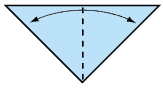 |
| 1. Start with a square piece of paper, white side up. Fold in half. | 2. Fold this triangle in half, crease well then open. |
 |
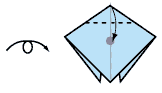 |
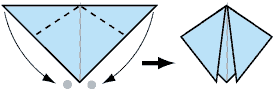
| 3. Fold the top 2 corners downwards, but not right to the centre line: leave a little gap. | 4. Turn model over. Fold down top corner to the centre point of the model. |
 |
 |
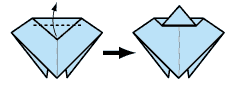
| 5. Now fold this corner upwards, and flatten. | 6. Turn back over. Finished Ladybug |
Follow this link for more instructions for other cool origami projects:
Cell Phone Ettiquette

Stay Interesting on Twitter
1. Twitpic something – Photos of you and other Twitter friends,  a painting you like, almost anything will do. A picture is worth a thousand words, or in Twitter’s case, 140 characters.
2. Events – #Hashtag a conference you’re heading to and you can meet someone new even before you get there. Sometimes the most powerful thing about social networking is taking it to the next step – and meeting in person.
3. Comments on a story – Leaving a thoughtful comment on a reporter’s or blogger’s story, then tweeting it out and spreading the word, may help you get that media attention you’ve been seeking. You might just be a source for their next story.
4. All your favorite blogs, all at once – Create a My Alltop page with all the blogs you follow and tweet it out. Building this page also gives you a great resource for interesting links to share.
5. Ask a question – Promote discussion and different perspectives and you’ll get to know who’s in your community better.
6. Ask for help – Whether you’re fixing a technical snafu on your blog or hiring someone for your team, try asking your community for help. You’ll be surprised at the speed and quality of response you’ll get.
7. Be helpful – Tweet a cause or charity and how people can help out. You can create a ripple effect to change the world, one tweet at a time.
8. Share your opinion – Go ahead, let it out! Especially if you can share a lesson about business, customer service, or whatever expertise you have, that your followers don’t.
9. #FollowFridays, #ThankfulThursdays – Promote another brand or person unabashedly. It’s a great way to introduce some of your favorite people and get known as a connector.
10. Share your success – Yes, there is a “ME” in Social MEdia. As long as you don’t go over the top, people are more than happy to congratulate you. Do the same for others.
11. Announcements – Speaking at a conference? Launching a new product? Writing a book? Tell others as you go along and build up anticipation at the same time.
12. Groupon, giveaways, and discounts – Share the news and the savings. Everybody loves deals.
13. Foursquare – Tweet where you are at the moment and maybe a Twitter friend you’ve been wanting to meet is at the exact same location. Meet up!
14. Be quotable – Who doesn’t love an inspiring quote? Share some life wisdom with others and remember: “Be Yourself. Everyone else is already taken.” (Oscar Wilde)
15. Share a video – A funny video or your favorite song can add personality to your account. Here’s one of my all-time faves: 8 Irresistible Principles of Fun.
Still stuck? Then tweet about your loves – have fun with Twitter and share your passions. We can never, ever, have enough of that.
Get a Great Profile Pic
Setting up the shot
You: and only you. No pets. No children. No trees. No vehicles. No significant others. No drinking buddies.
Clothes: No nude profiles, please. Aim for “job interview” or “lunch date”. Keep accessories to a minimum, and stick to solid color tops.
Eye contact: look right into the camera, seeming to look right in the eyes of the viewer. Again, look at the camera, especially the webcam, not the monitor.
Contrast: there should be about an equal balance of dark areas and light areas. Take note of what you’re wearing, along with your hair color, when choosing what will be in the back drop.
Positive: Smile. Even just a little bit. Or go all-teeth-out if you want. And try to be genuine. Unless you are searching for a job as a freelance murderer.
Taking the shot and editing
Self-timer: If you don’t know what this is, go get your camera manual right now and look it up. Use a tripod– borrow one, set your camera on a shelf or a cardboard box, or get a friend to press the shutter release. Set the timer, and stand back. No more taking photos at arm’s length– ever.
Pro photographer tip: Extend the zoom (manual, not digital) when taking a portrait shot: zoom in as much as possible with the lens and then take the shot from as far as you have to. Mass-market cameras are by default wide-angles. Wide angles are not the most flattering for headshots because they distort facial proportions, i.e. features closest to the lens (nose!) will appear disproportionately larger. So manually zoom in as much as your camera will let you, and then step back and take the shot. — Kristina V.
Direction: At the very least, face the camera head-on. Better yet, show a three-quarter view (that means, your face from one ear to the nose, plus half way to your other ear). If you go with three-quarter view, or any other angle, make sure you flip the photo if necessary so that you are facing what you want people to read next.
 Do It And How